Publishing every day by hand on various networks consumes hours that a small business does not always have. AI social media automation solves this by scheduling posts in advance and automatically suggesting text, without you having to write everything from scratch every time. This guide on social media automation summarizes the criteria that should be reviewed before choosing.
Social media automation allows you to compare functions, limits and context before deciding. Social media automation allows you to compare functions, limits and context before deciding.

Social media automation requires comparing functions, limits and context before deciding. Social media automation requires comparing functions, limits and context before deciding.
social media automation: criteria and guide
Official source: Buffer official site.
Before automating, define how much time you dedicate to your networks today
Before choosing a tool, check how many networks you manage and how often you post. So if you post once a week, you may not need a paid plan yet. Therefore, before contracting any plan, define how serious your social media automation with AI will be: publish every day, or just reinforce every week. If you already use other AI tools in your business, also review our guide on The best AI tools to automate repetitive tasks. Since some connect directly to these platforms, in fact, it is worth checking both together.
Buffer: free to start, with AI assistant included
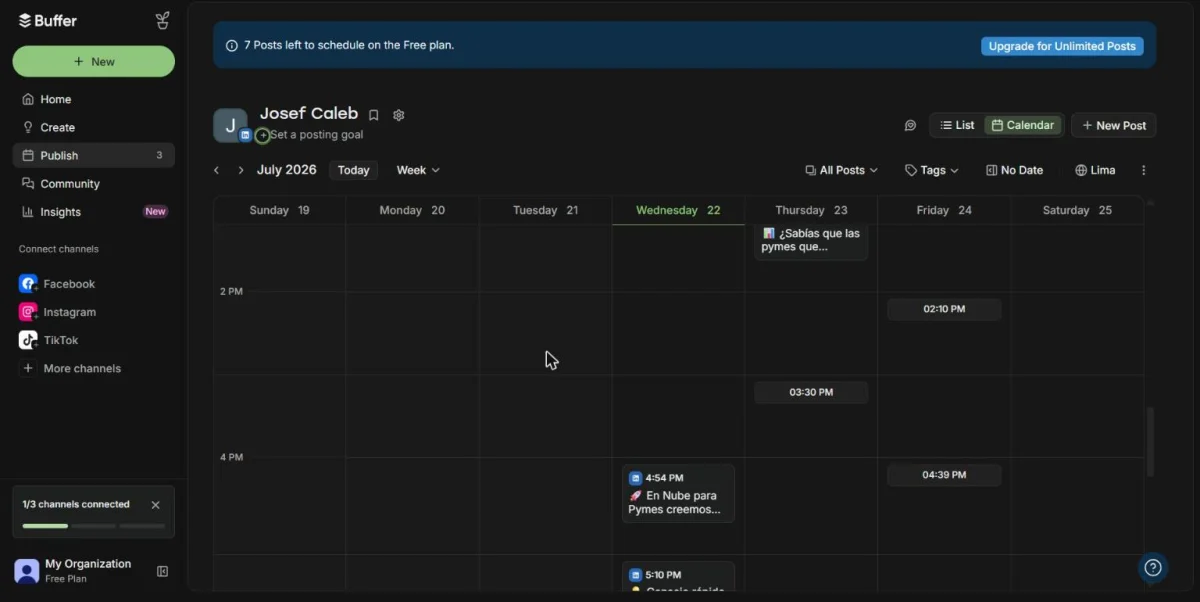
Buffer offers a free plan with ten scheduled posts per channel and one user. Its AI assistant helps write and adapt texts for each social network. Additionally, the Essentials plan costs $5 per month per channel, according to Buffer's official page verified today. The Team plan, for its part, goes up to $10 per month per channel and adds more users.
Later: ideal if your content is primarily visual
Later focuses on brands with highly visual content, such as product photos. Their Starter plan costs $18.75 per month with annual billing, according to their official site. This plan includes five AI credits per month to generate texts with your Caption Writer. However, if you need more credits, the Growth plan goes up to $37.50 per month and offers fifty. Thus, a brand that publishes photos every day does not run out of credits in the middle of the month.
Hootsuite: more complete, but designed for large teams
Hootsuite targets larger teams, with an assistant called Wisdom AI included in all plans. Its Standard plan costs $99 per month per user, according to the official website verified today. Therefore, this price is usually outside the budget of a business just starting out. Still, Hootsuite is convenient when you already manage many accounts at the same time.
Comparison table: social media automation tools
| Tool | Free plan | Plan paid from | Ideal for |
|---|---|---|---|
| Buffer | 10 posts/channel, 1 user | $5/month per channel (Essentials) | Businesses that are just starting |
| later | 14 day trial | 18.75 USD/month (Starter, annual) | Brands with very visual content |
| Hootsuite | Does not have a free plan | 99 USD/month per user (Standard) | Teams that handle many accounts |
What to look at besides the price
Price is not the only thing that matters when automating your networks. Also check if the tool allows you to approve the content before publishing it, because AI-generated text sometimes sounds forced. On the other hand, confirm how many AI credits each plan includes, as they run out quickly if you schedule a lot of posts. Ultimately, a well-configured AI social media automation saves time without sacrificing your brand tone.
Free tool: Operational Tasks and Projects
Before paying for a platform, define tasks, responsible parties and dates. A simple flow allows you to evaluate software with a real process, not just a list of features.
What this looks like in practice
A business that only posts to one network gains time almost immediately with Buffer's free plan. A brand with product photos every week, on the other hand, takes better advantage of Later's visual features. No plan replaces human review before publishing. In fact, poorly AI-generated text can hurt your brand more than it helps it. Therefore, it is advisable to let the AI propose the text, but not decide on its own what to publish.
How to choose based on how many networks you manage
If you manage one or two social networks, Buffer's free plan is usually enough without paying anything. If you manage multiple accounts for different clients, Hootsuite offers more team control. Additionally, if you also need to generate images or longer text for marketing, check out our guide on AI tools to create marketing content in SMEs. Several of those options, in fact, complement this AI social media automation well.
FAQ on scheduling posts with AI
Do I need to know design to use these tools? No. All three offer templates and automatic suggestions, without requiring prior knowledge of graphic design.
Does the AI publish on its own, without me reviewing anything? Not necessarily. You can set each post to remain in draft until you approve it. For this reason, many companies activate manual review as a mandatory step before publishing.
Do these tools replace a community manager? Not at all. They save time on programming and texts, but someone must define the strategy and respond to comments.
Which of these options is best for a business that is just starting? Buffer, for its free plan. Later and Hootsuite are best when you already bill enough to justify the expense.
Social Media Automation with AI: in summary
Choosing an AI social media automation depends on how many accounts you manage and how much visual content you produce. Buffer wins on price to start, Later on visual content, and Hootsuite on large teams. In the next article we review the best AI tools to create marketing content in SMEs, to complete the process from idea to publication.