Do you already use Trello or Asana for day-to-day tasks? If you feel like you are missing a space to document processes, internal wikis or more flexible databases, the Notion vs ClickUp comparison is the next logical step. Both tools promise to be “all in one” for SMEs that want to stop jumping between five different apps. However, they start from quite different philosophies: Notion was born as a flexible documentation space that later added project management.
ClickUp, on the other hand, was born as a task manager that later added documents and wikis. In this complete 2026 comparison we review price, features and learning curve to help you choose the right tool for your team. This guide on Notion ClickUp summarizes the criteria that should be reviewed before choosing.
Notion vs ClickUp: criteria and guide
Quick Verdict: Notion or ClickUp?
Notion for knowledge bases and notes; is the most natural choice when the focus of the work is documents, wikis, decisions and flexible databases. ClickUp for strict control of deliveries and times; fits best when you need responsible parties, statuses, dates, dependencies, tracking and execution reports.
If your team combines both problems, decide which system will be the primary source and avoid duplicating the same project on two platforms.
Notion: the flexible wiki-like workspace

Notion was built around the idea of nested pages. Each page can become whatever you need: a simple note, a database, a calendar or a kanban board. That flexibility is its greatest strength. In fact, many SMBs use Notion like internal wiki to document processes, policies, and new employee onboarding, as well as manage projects in the same space. The counterpart is that, precisely because it is so moldable, putting together an ordered structure from scratch takes more time. That's why Notion tends to be a better fit for teams that value documentation as much as task tracking.
ClickUp: all-inclusive task management
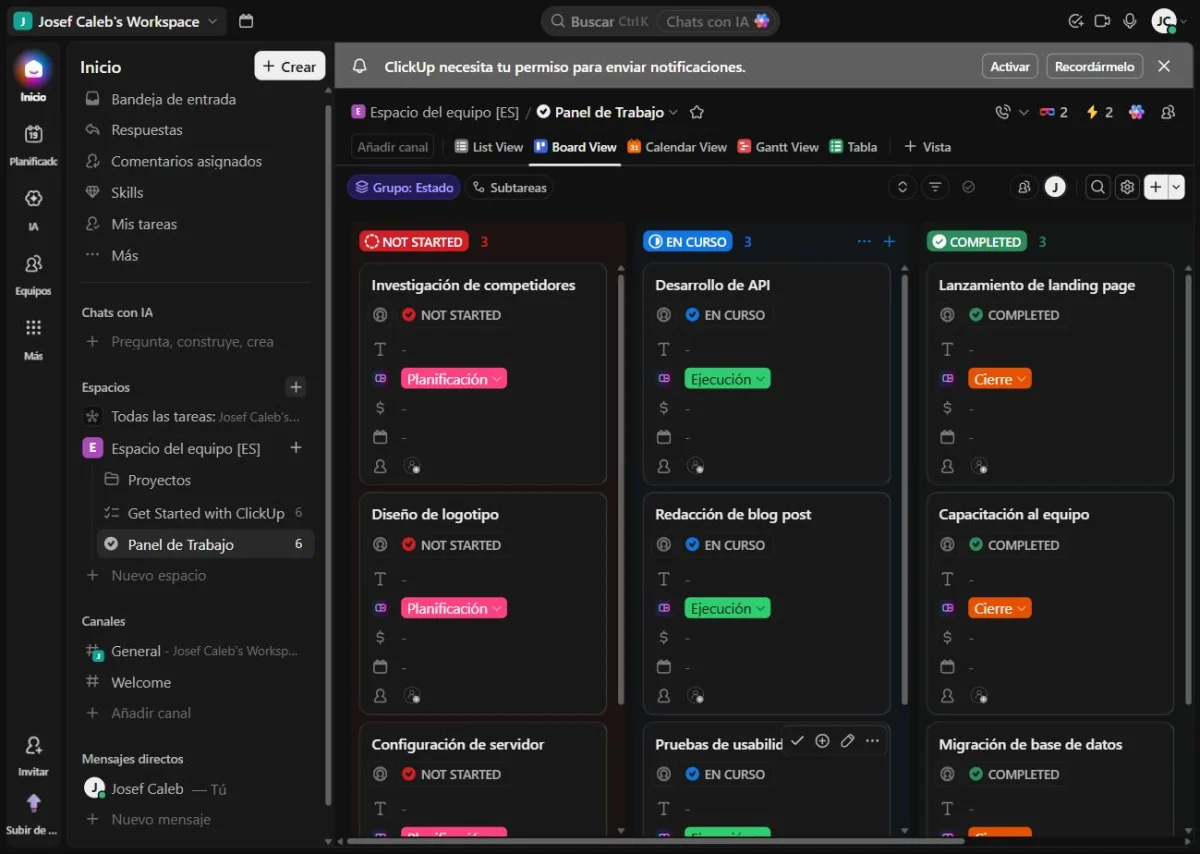
ClickUp, on the other hand, was born focused on task and project management, and it shows. It comes out of the box with more than fifteen different views (list, board, calendar, Gantt, workload, among others), in addition to custom fields and automations already configured for common cases. It also includes documents and its own wiki function, so in practice it competes directly with Notion in that area. Its advantage in the Notion vs ClickUp debate is that it comes with more predefined structure. This reduces initial setup time for a team that already knows how they want to organize their work. The downside is that with so many options visible at once, the interface can feel cluttered at first.
Notion vs ClickUp: prices and plans in 2026
When comparing Notion vs ClickUp on price, both offer a generous free plan to start, but the limits that really matter are in the fine print: storage, change history, and number of external guests. This table summarizes the main plans of each in 2026:
| Plan | Notion | ClickUp |
|---|---|---|
| Free | Limited blocks for teams of 2+ people, 5 MB per file, 7 day history, 10 external guests | Unlimited tasks and members, 60 MB total storage, 1 form |
| Intermediate plan | Plus: 10 USD/member/month | Unlimited: $7/user/month |
| Advanced plan | Business: $20/member/month | Business: 12 USD/user/month |
| Companies | Enterprise: price on request | Enterprise: price on request |
Here ClickUp usually works out cheaper plan by plan, especially at the intermediate level. However, Notion's free plan does not limit the number of team members like other tools do, it only limits how many blocks a shared space can accumulate; So for very small teams just starting to document processes, it may take longer than expected before needing to pay.
Learning curve: which is easier to master?
This is where Notion vs ClickUp separate themselves the most. Notion asks you to define the structure yourself: what databases you need, how they relate to each other, what template to use for each type of project. That gives total freedom. However, it also means that someone on the team has to spend time designing that system before everyone else starts taking advantage of it.
ClickUp, on the other hand, already comes with templates and views ready for project management from day one. Thus, a team can start working almost immediately, without having to design anything from scratch. If your team doesn't have anyone with the time, or inclination, to put together a custom system, ClickUp is usually the quickest option to adopt.
Templates and integrations
In templates and integrations, Notion vs ClickUp is quite even. Both platforms feature huge galleries of community-made templates, from editorial calendars to homemade CRMs armed with databases. In integrations, Notion connects well with Slack, Google Calendar, and Figma. ClickUp, for its part, adds native integrations with development tools such as GitHub and GitLab, in addition to Slack and Google Workspace themselves. If your team includes developers, that difference may tip the balance toward ClickUp; If your priority is visual and collaborative documentation, Notion still has the advantage.
Do you already use Trello or Asana? When it makes sense to add Notion or ClickUp
If your SME still organizes tasks with post-its or in a group chat, before adding Notion or ClickUp you may want to start with something simpler. In our Trello vs Asana comparison we review two tools that are easier to adopt for a small team that is just getting its workflow in order. The Notion vs ClickUp debate comes only later, when you already need more advanced documentation or views. And if, in addition to projects, you need to organize your relationship with your clients, our guide on how to migrate from Excel to a CRM without losing data helps you take that same leap, but on the commercial side of your business.
Notion vs ClickUp FAQ
Notion is often a better fit when the priority is to create, link, and reference documents, wikis, and notes with a flexible structure.
ClickUp is usually more suitable when you need responsible parties, statuses, dates, dependencies, times and operational tracking of tasks.
Yes, but it is advisable to define a main source and a clear integration or link to avoid maintaining two versions of the same project.
Is Notion or ClickUp better for a team just starting out? If your team doesn't have time to design their own structure, ClickUp tends to adapt faster thanks to its predefined templates; Notion is best if you value flexibility and are already clear about how you want to organize information.
Can I use Notion and ClickUp at the same time? Yes, although it is not ideal: many SMEs end up using Notion as a process wiki and ClickUp only for tasks, but maintaining two different sources of truth usually generates confusion in the medium term.
Which has a better free plan, Notion or ClickUp? It depends on what you need: ClickUp does not limit the number of free members, while Notion does not limit the number of pages for individual use as much. For teams of more than one person, check Notion's block limits carefully before deciding.
Notion vs ClickUp, which is easier to migrate from Trello or Asana? ClickUp has direct importers from Trello and Asana that bring in cards and projects almost automatically; In Notion, migration typically requires more manual work because you must first design the target database.
Define your flow before migrating
Try a basic structure with our task and project tool for SMEs and decide if your main need is to document or control deliveries.
Notion vs ClickUp: in summary
In the Notion vs ClickUp debate there is not an objectively better tool, but rather one that best fits the moment of your team. If you value the freedom of building your own system and plan to also use it as an internal wiki, Notion is the right bet. If you prefer something that works well from day one, with views and templates already designed for project management, ClickUp saves you configuration time. Whatever your choice, both far outperform coordinating a team via chat and loose spreadsheets.