You have pending items scattered among notes, chats and the memory of each person on the team. That's why you want to put things in order without paying or installing anything complicated. Learning how to create a Kanban board from scratch is the simplest change a small team can make. This way you stop losing tasks between individual messages. You don't need previous experience or a course. In fact, in less than 20 minutes you can have your first board working with clear rules. This guide on creating a kanban board summarizes the criteria that should be reviewed before choosing. create kanban board: This guide summarizes criteria, limits, and steps for choosing with context.
creating a kanban board allows you to compare functions, limits and context before deciding. creating a kanban board allows you to compare functions, limits and context before deciding. creating a kanban board allows you to compare functions, limits and context before deciding.
crear tablero kanban: esta guía reúne criterios, límites y pasos para elegir con contexto.
Creating a kanban board requires comparing features, boundaries, and context before deciding.
create kanban board: criteria and guide
What you need before creating a Kanban board
Before opening any tool, define who is going to use the dashboard and for what.
Step 1: define the columns of your board
Start simple: three columns are enough for almost any team. Use To Do, In Progress, and Done as a starting point. Of course, you can add a Review column later if you really need it. However, avoid creating eight or ten columns from day one. A board with too many columns confuses more than it orders. Plus, no one ends up updating it if each card has to go through six different steps.
Step 2: create the cards with the real tasks
Each card should represent a single task, not an entire project. Write clear and specific titles, such as Send quote to customer X, not simply Sales. Add the deadline and responsible person directly to the card. Thus, anyone who opens the dashboard understands the real state without asking. On the other hand, avoid creating generic Miscellaneous Tasks type cards. These types of cards end up accumulating pending items without a date or owner, and no one ever moves them.
Step 3: Set a limit on tasks in progress
Visual diagram of a Kanban flow
A useful board makes the flow visible and limits the work that is open at the same time. Adapt the names to your process:
| to do | In progress | Under review | Done |
|---|---|---|---|
| Ideas priorizadas Máximo sugerido: sin límite operativo | Tareas que alguien está ejecutando Límite WIP: 2-3 | Validación, QA o aprobación Límite WIP: 1-2 | Entregas aceptadas Revisa y archiva periódicamente |
Reading the diagram: if “In Progress” fills, do not open any more tasks; helps finish what you started. If “In Review” accumulates, the bottleneck may be in approval and not execution.
This step is the one most teams skip when creating a Kanban board for the first time. Limit to 2 or 3 cards per person in the In Progress column. If someone already has 3 cards there, they shouldn't start a fourth. That simple rule prevents the entire team from half-working on ten things at once. In addition, it immediately makes visible where the bottleneck is. In fact, it's the main difference between a real Kanban board and a simple task list.
Kanban vs. a simple task list
A to-do list tells you what needs to be done. A Kanban board, on the other hand, shows you where each task is and who has it in their hands. That visibility is just what you lose when everything lives in a note or a group chat. Therefore, if your team is already more than 3 people, it is worth taking the leap. Still, if you work alone, a simple list may still be sufficient.
Trello: the fastest way to create your first board
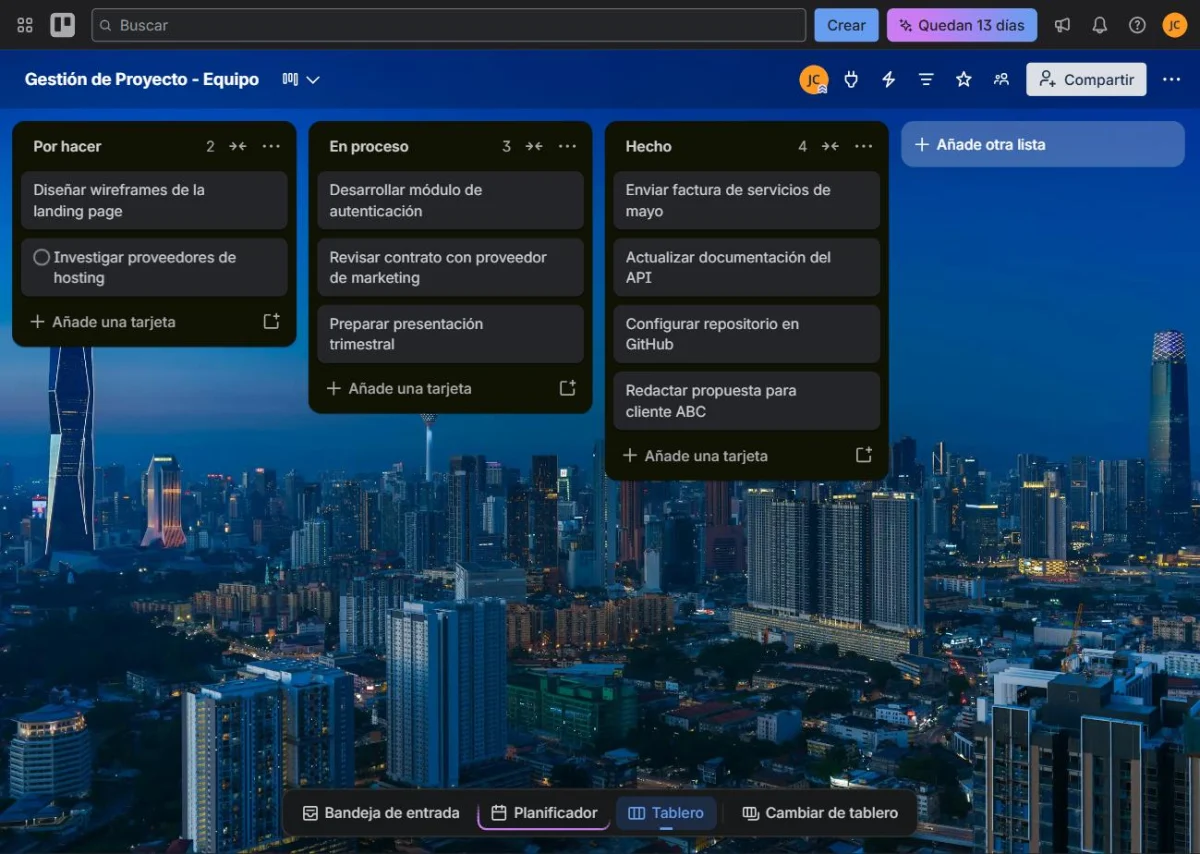
Trello is the most direct option to build your first Kanban board, even in its free plan. Create a new board and name it something recognizable to the team, like July Projects. Add your columns as lists, in the same order you defined in step 1. Then add a card for each real task, with date and responsibility. Finally, invite the team and explain the rules out loud before they start moving them on their own. The first few days it is advisable to review the board together, to correct habits before they become habit.
Common mistakes when creating a Kanban board for the first time
The most common mistake is creating too many columns before you have real tasks to fill them. Another common mistake is leaving cards without a date or person responsible, so no one feels the responsibility to finish them. In fact, the team sometimes puts together the board with a lot of enthusiasm. But no one checks it after the first week. Therefore, it is advisable to assign a single person the task of remembering to update it daily. In short, a board only works if someone takes care of it to stay alive.
How to keep the board updated without it becoming a graveyard of tasks
Set aside 5 minutes at the end of each day to move the cards that were advanced. Don't leave that review until Friday, because it accumulates and becomes a heavier task than necessary. If your team works remotely, daily coordination is even more important. Many remote teams use Trello for this very thing. Therefore, you can review our guide on how to organize a remote team with Trello to reinforce those habits.
FAQs on creating a Kanban board
Start with the columns strictly necessary to distinguish pending work, execution, review and finished. Add states only if they represent an actual decision or block.
It is the maximum number of tasks allowed in a work stage. Limiting it helps detect bottlenecks and avoids opening more tasks than the team can finish.
Yes. You can start with a simple dashboard tool and migrate when you need more advanced permissions, automations, reports, or integrations.
How many columns should a Kanban board have at the beginning? Three are enough: To Do, In Progress, and Done. However, add more only when the team really needs them.
Do I need to pay for a tool to create a Kanban board? No. Trello, ClickUp and Notion allow you to create full Kanban boards in their free plan.
How long does it take to create a Kanban board from scratch? Between 15 and 20 minutes if you already have the task list ready. Explaining the rules to the team may take a little longer.
What happens if the team stops updating the dashboard? Check if the columns or rules were too complicated. In short, an abandoned board almost always means that it needs to be simplified, not reinforced.
Create your first task flow
You can move this schema to our task and project tool for SMEs and test it with a small project before rolling it out to the entire team.
Creating a Kanban board: in summary
Creating a Kanban board from scratch requires no technical expertise or budget. It requires defining simple columns, clear cards, and a limit on tasks in progress. So start with the simplest version possible and adjust only when the team asks for it. In the next article we will see the best project management tools for marketing agencies. It doesn't matter which of these tools you end up choosing.