You finished a project for a client in Mexico and now you need to issue the correct tax receipt. Electronic invoicing in Mexico is not optional: the SAT requires a valid CFDI for each collection, regardless of whether you work for fees or have business activity. The good news is that the process is free if you use the official SAT tool. Here is the complete guide, with the current requirements and recommended platforms. This guide on electronic invoicing Mexico summarizes the criteria that should be reviewed before choosing. This guide on electronic billing in Mexico summarizes the criteria that should be reviewed before choosing. electronic billing Mexico: this guide summarizes criteria, limits and steps to choose with context.
Electronic billing Mexico allows you to compare functions, limits and context before deciding. Electronic billing Mexico allows you to compare functions, limits and context before deciding.
facturacion electronica mexico: esta guía reúne criterios, límites y pasos para elegir con contexto.
Electronic billing in Mexico requires comparing functions, limits and context before deciding.
Mexico electronic billing: criteria and guide
electronic invoicing Mexico: criteria and guide
What you need before issuing your first invoice
Before starting electronic invoicing in Mexico, confirm three things. First, your RFC must be active and registered with the SAT. Second, you need your Password or your e.signature, depending on which tool you use to bill. Third, confirm your tax regime: the majority of freelancers are in Business and Professional Activities or RESICO. Without these three correct data, the system rejects the receipt or issues it with errors.
SAT: the official and free platform for billing
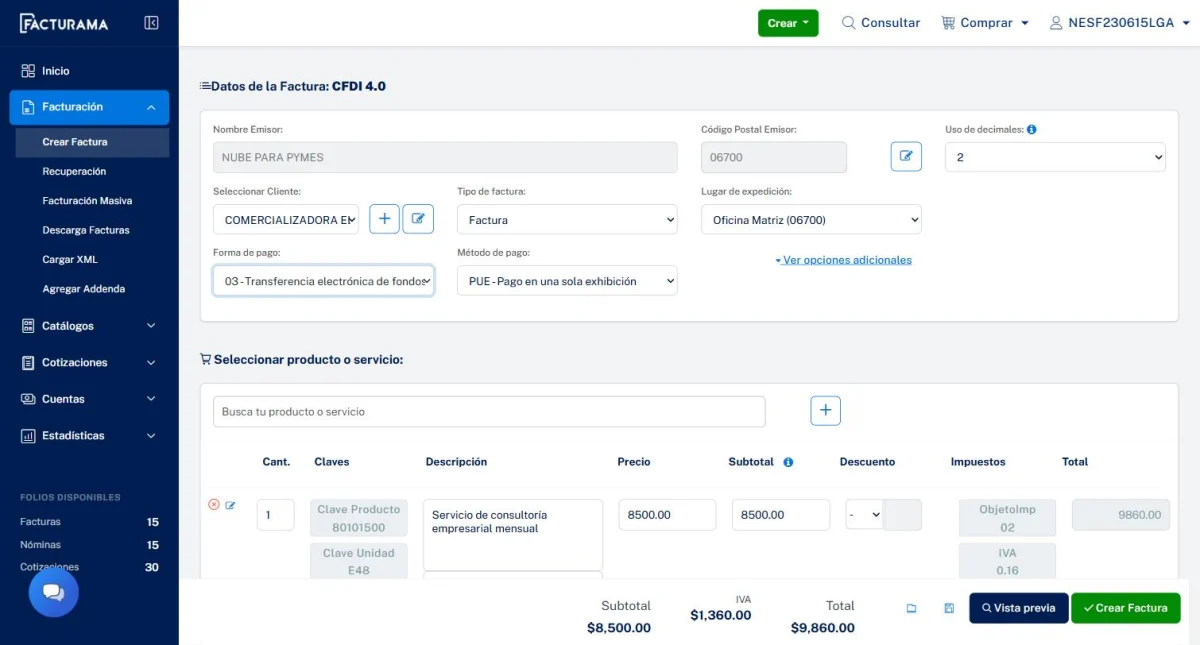
The SAT offers Electronic Invoice in My Accounts, a free tool designed for individuals with low billing volume. There is also the Invoice SAT Móvil app, useful if you need to stamp a receipt from your cell phone. Therefore, for electronic invoicing in Mexico with a few clients per month, you do not need to hire any external software. Only if your volume grows a lot, or you need to automate the process, is it worth checking out private platforms with more features.
Step 1: enter Electronic Invoice in My Accounts
Enter the SAT portal with your RFC and your Password or e.firma. Look for the option to generate an invoice for your activity as a natural person. There you will find the form to issue your receipt. Therefore, save the direct link among your favorites, because you will use it every time you invoice.
Step 2: complete the receipt details
Enter your client's RFC exactly as it appears on their tax certificate. Additionally, it describes the service provided clearly. Enter the amount before any applicable withholding. Also select the corresponding tax regime and use of CFDI. Therefore, ask your client for this information before starting the process, so as not to interrupt it halfway.
Step 3: Check before ringing
Review each information carefully before continuing. Once stamped, the CFDI cannot be edited directly. If you made a mistake, you will have to cancel it and issue a new one, which may require customer acceptance. Therefore, this verification step is the most important of the entire process. When you confirm that everything is correct, stamp the receipt. The system generates the XML and the PDF, and registers it with the SAT.
CFDI 4.0: what changes and what you should confirm
CFDI 4.0 is still the current version, mandatory from 2023. Of course, there is a recent clarification that is worth knowing. The SAT confirmed that the printed Tax Status Certificate is no longer a legal requirement for a client to invoice you or for you to invoice. What must always match is your data: RFC, name and postal code, as stated in the SAT. Therefore, although you do not need the physical document, you do need that data to be correct and updated.
RESICO or Business Activities: which regime suits you
RESICO applies if your annual income does not exceed 3.5 million pesos. This regime does not allow deductions, but calculates the tax at a low rate on what was actually collected. The Business and Professional Activities Regime, on the other hand, does allow expenses to be deducted. Of course, a higher progressive rate applies. Therefore, if you have few deductible expenses, RESICO is usually better. If, on the other hand, you deduct equipment, office or tools on a regular basis, the traditional regime can save you more per year.
When it is convenient to use a private platform
If you bill more than a handful of clients per month, a private platform saves real time. For example, Facturama offers packages starting at 55 pesos for ten pages per year, useful for low volumes. Alegra, with plans from 138 pesos per month, adds reports and automation of recurring billing. We already compared that option in depth in our article on best e-invoicing software for freelancers.
Common errors when invoicing as a freelancer in Mexico
The most frequent mistake in electronic invoicing in Mexico is writing the client's RFC with the wrong character. This forces the CFDI to be cancelled. Another common mistake is choosing a CFDI use that does not correspond to the service provided. It also happens that some freelancers do not update their tax regime after exceeding the RESICO limit. Therefore, review your tax data at least once a year, not just when you invoice.
How to choose according to your billing volume
If you invoice a few clients per month, the free SAT tool covers everything you need. If, however, you already constantly invoice several clients, it is worth checking out a private platform. It's also convenient if you need to automate payment reminders. We already covered this comparison with current prices in our article on how to bill as a freelancer in Peru, which follows a similar logic although with different tax rules.
Free tool: Cash Flow and Collections
Before hiring a suite, organize income, expenses and due dates. This way you will have concrete criteria to compare functions, support and cost.
Frequently asked questions about electronic invoicing in Mexico
Do I need to pay to issue CFDI as a freelancer? No. The Electronic Invoice tool in My SAT Accounts is free for individuals with low volume.
Do I need a printed Proof of Tax Status to invoice? It is not mandatory as a document. Of course, your tax data must match exactly with the SAT records.
What happens if I make a mistake when stamping a CFDI? You must cancel it and issue a new one. Therefore, check each information before confirming the stamping.
Is RESICO always suitable for freelancers? Not always. It is more convenient if you have few deductible expenses. If you deduct a lot, the traditional regime can save you more.
Electronic invoicing in Mexico: in summary
Electronic invoicing in Mexico does not require hiring software if your volume of clients is low. The free SAT tool covers the essentials for most freelancers. Have your RFC, your Password and your tax regime up to date, and the rest of the process takes minutes. With this we close the billing and accounting category. In the next articles we explore artificial intelligence tools to automate repetitive tasks in your SME.