Every month you create the same invoice for the same client, changing only the date. That repetitive work is exactly what you can eliminate. Automating recurring billing means setting up the template, frequency, and billing once, and letting the system do the rest. In fact, most billing platforms already include this feature, although few businesses activate it. Here are the concrete steps to stop issuing manual invoices every month. This guide on automating billing summarizes the criteria that should be reviewed before choosing. automate billing: This guide summarizes criteria, limits and steps to choose with context.
Automating billing allows you to compare functions, limits and context before deciding.
automatizar facturacion: esta guía reúne criterios, límites y pasos para elegir con contexto.
Automating billing requires comparing features, limits and context before deciding.
automate billing: criteria and guide
What is recurring billing and when should it be automated
The recurring billing applies when you charge the same, or a similar, amount to the same client on a periodic basis. Think about a monthly subscription, a permanent mentorship or a maintenance service. If you already invoice like this, but you do it by hand every time, you are wasting time unnecessarily. We already reviewed the available e-invoicing options in our article on best e-invoicing software for freelancers. Most of those platforms already support recurring billing. Therefore, before automating recurring billing in your business, confirm that your current tool includes this function.
Step 1: Choose a platform with recurring billing
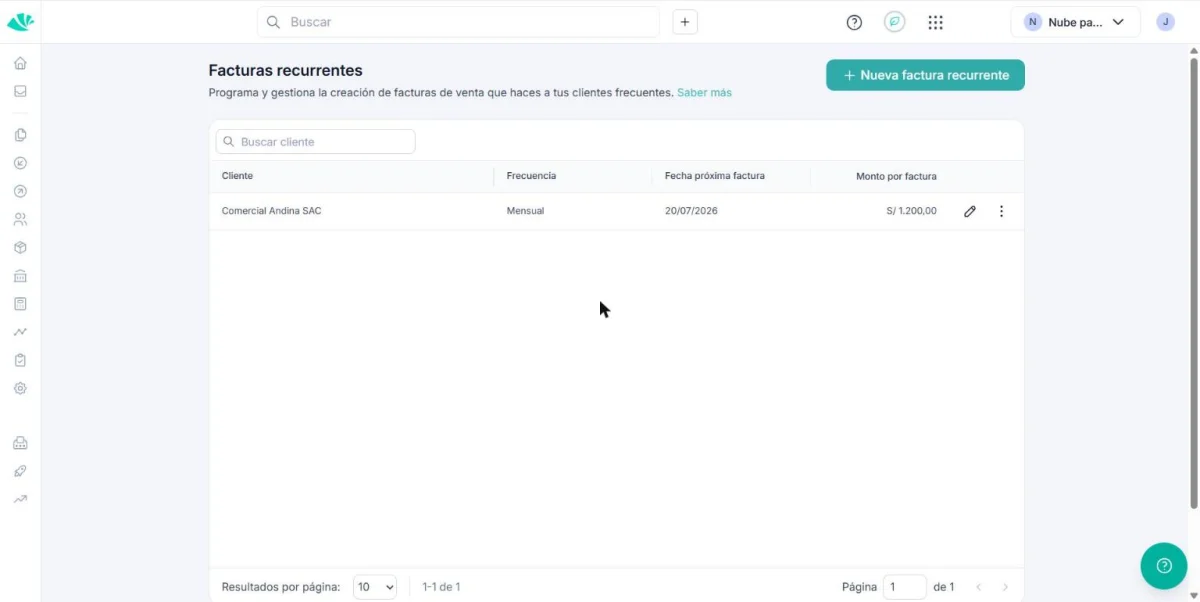
Not all platforms include this feature in their cheapest plan. For example, FreshBooks only activates automatic recurring billing from their $43/month Plus plan. Before automating, confirm that your current plan actually includes this option. If it doesn't include it, check if it's worth upgrading. You can also change tools before continuing with the configuration. In fact, comparing two or three platforms before deciding avoids having to migrate the entire process later.
Step 2: Create a recurring invoice template
Enter the recurring billing section of your platform. Create a template with the fixed data: client, service, amount and currency. Leave blank only what changes each time, such as the invoice number. Check the template twice before saving it. An error here is automatically repeated on each future submission.
Step 3: define the frequency and charging method
Choose the exact frequency: weekly, monthly or annually, depending on your agreement with the client. It also defines the start date and, if applicable, the end date of the cycle. If your platform allows it, activate automatic payment with saved card. This way, the client does not have to approve each payment manually. Of course, confirm with your client before activating automatic charges, to avoid surprises.
Step 4: Activate automatic payment reminders
Even with active recurring billing, some customers pay late. Therefore, activate automatic reminders before and after the due date. Most platforms allow you to schedule two or three spaced reminders. This reduces the need to manually write to each overdue customer.
Common mistakes when automating recurring billing
The most common mistake is automating before confirming the exact amount with the client. Another common mistake is forgetting an end date, which generates indefinite charges that no one reviews. It also happens that some businesses activate automatic charging without notifying the customer, which generates complaints. Additionally, some businesses forget to review the template after a price change, and continue charging the previous amount for several months. Therefore, review each setting carefully before activating it completely. In short, an error in the template repeats itself, so it is advisable to detect it early.
Automate recurring billing in practice
A consultant who charges a fixed mentorship fee each month saves about an hour per month by automating their recurring billing. An agency with ten monthly maintenance clients saves significantly more, because it multiplies that savings for each client. A freelancer with only one recurring client may not notice that much of a difference. Therefore, the real benefit of automating grows depending on how many regular clients you bill each month.
How to choose according to the type of client you bill
If you have few recurring clients with fixed amounts, any platform with basic recurring billing is enough for you. If, on the other hand, you manage many clients with variable amounts, it is worth reviewing our comparison of accounting software for SMEs, with more complete reports. And if your priority now is to improve collection, not just shipping, also check out our guide on how to automate sending invoices and payment reminders.
Free tool: Cash Flow and Collections
Before hiring a suite, organize income, expenses and due dates. This way you will have concrete criteria to compare functions, support and cost.
Automating Recurring Billing FAQs
Do all billing platforms include recurring billing? Not all. Some limit it to higher paid plans, so it is a good idea to check before contracting.
Can I change the amount of an already configured recurring invoice? Yes, almost always. Just edit the template and the change applies from the next cycle.
Is automatic payment safe for the client? Yes, as long as you use a platform with certified payment processing. Even so, notify the client before activating it.
What happens if the client cancels mid-cycle? You must disable recurrence manually. Most platforms do not detect it automatically.
Automate recurring billing: in summary
Automating recurring billing saves real time each month, especially if you already bill fixed amounts to the same clients. Choose a platform that supports it, configure the template carefully and activate payment reminders. In the next article we review how to automate sending invoices and payment reminders, to get paid faster without manual effort.