Are you still responding to your clients on WhatsApp from your personal cell phone, without any history records? A good CRM with integrated WhatsApp centralizes those conversations along with the rest of the customer information. For this reason, many small businesses only look for this integration when they have already lost the thread of an important conversation with a customer. This guide on CRM WhatsApp summarizes the criteria that should be reviewed before choosing.
CRM WhatsApp: criteria and guide
Table of Contents
Toggle
Quick comparison: CRM with WhatsApp in 2026
Before contracting, separate three costs: the CRM license, the number of users or agents, and WhatsApp/Meta or integration provider messaging charges. Conditions change, so this table works as an initial filter and must be confirmed on the official website.
| Option | Focus | Users or agents | Cost you should check | Buy signal |
|---|---|---|---|---|
| Kommo | Conversational CRM with funnels and WhatsApp | Billed per user; the number of channels depends on the plan | Monthly license per user and connected channels/numbers | Commercial team that works mainly from WhatsApp |
| HubSpot CRM | generalist CRM; WhatsApp may depend on the product, plan or integration | Review included users and permissions of the contracted plan | CRM, conversations module and possible external integration | Company that prioritizes a broad CRM and ecosystem of integrations |
| Zoho CRM | Modular CRM with automation and integrations | Confirm users and edition before connecting WhatsApp | CRM editing, extension/partner and messaging charges | SME that wants customization and a modular ecosystem |
| Bitrix24 | CRM, tasks and collaboration on the same platform | The plan and permits determine operational capacity | Contracted plan, WhatsApp channel and connection provider | Team that wants to combine CRM and work management |
Official sources: see Kommo pricing page, HubSpot CRM, Zoho CRM and Bitrix24. Cloud for SMEs does not present these links as affiliates.
Before choosing, check if you need something more general first
Before choosing a specific CRM with integrated WhatsApp, it is worth checking if your business is already clear about what type of CRM it needs in general. If you still don't know which one fits your team size, our guide on best free CRMs in Spanish can help you decide that first step.
Free tool: CRM and Commercial Pipeline
Before comparing plans, test how your contacts, stages and follow-ups are ordered. A basic pipeline helps you define what information your future CRM should store.
CRM chosen with WhatsApp: Kommo
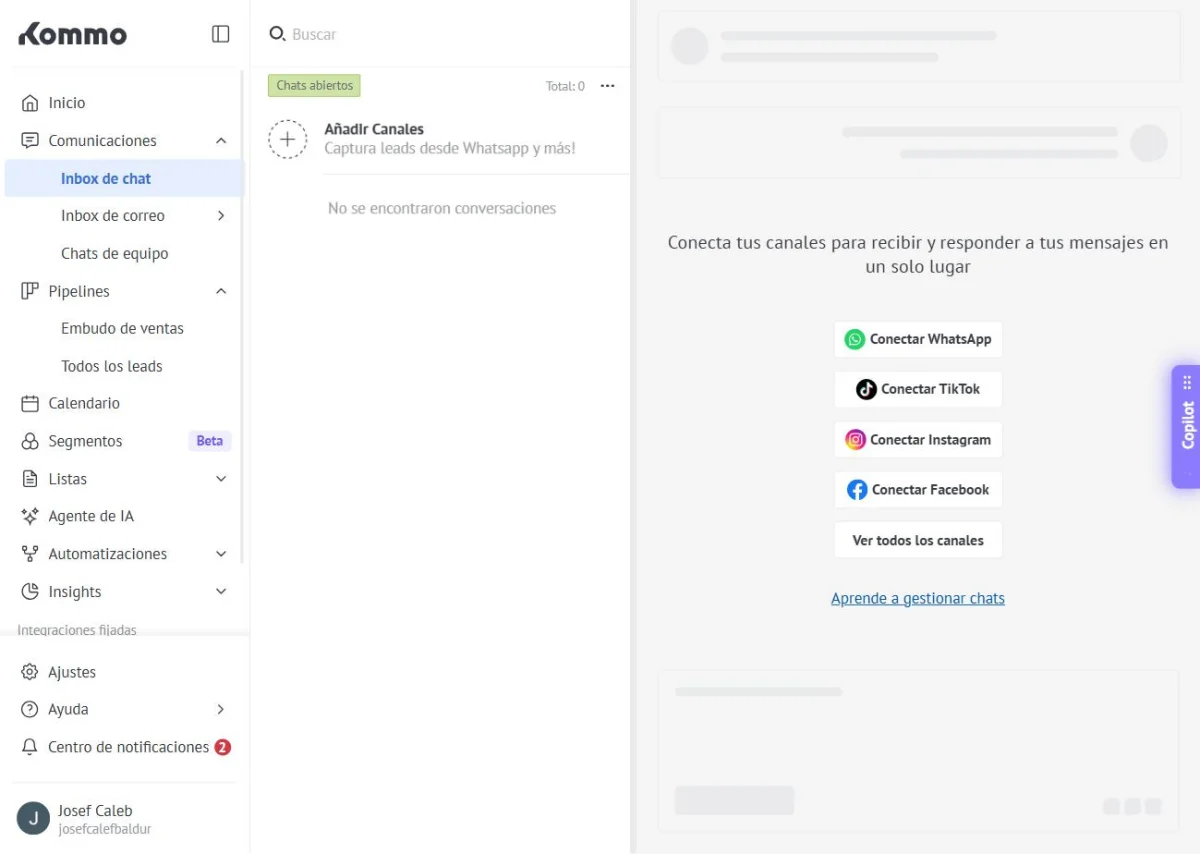
Kommo organizes a business's WhatsApp conversations within the same panel where each customer's information lives. In addition, each salesperson sees the complete message history without depending on a cell phone shared between the team. On the other hand, it allows you to build sales funnels directly on WhatsApp conversations, something unusual among other CRMs.
How much does Kommo cost
Kommo's Basic plan costs $15 per user per month, according to its official site verified today, with a WhatsApp number included. The Advanced plan, for its part, costs $25 per user per month and adds up to three WhatsApp numbers. Therefore, a business that serves a single WhatsApp channel can start with the cheapest plan.
What to look at besides the price
What to look at besides price matters as much as the monthly cost of the system. The number of WhatsApp numbers allowed, for example, may be the real reason for upgrading the plan. Likewise, it is worth checking if the system retains the complete history if a salesperson leaves the team.
What does this look like in practice
A business with few daily conversations gains order almost immediately just by centralizing a WhatsApp number. A business with more movement, on the other hand, makes better use of sales funnels and several numbers connected at the same time. However, no system replaces good customer service. In fact, it only organizes the administrative part of the conversation.
How to choose according to the volume of messages in your business
If you serve a few clients via WhatsApp per day, the Basic plan is usually enough to get started. This way, you avoid paying for features that you don't need yet. If, on the other hand, several sellers answer different WhatsApp numbers at the same time, it is advisable to add the Advanced plan. That is why this plan adds additional channels that better organize attention when the volume grows. Since each business receives messages at a different rate, it is a good idea to try the smallest plan before upgrading.
If you're looking to delve deeper into that specific integration, our guide on how to choose a CRM that integrates with WhatsApp Business goes into more detail.
Frequently asked questions about CRM with integrated WhatsApp
Do my clients need to install something to write to me on WhatsApp? No, the integration works on the same WhatsApp that your clients already use, without any additional app on their part.
Does the system save the history if I change seller? Yes, in fact that complete history is one of the main reasons to centralize WhatsApp in a CRM.
Can I use my current personal WhatsApp number? It depends on the platform, although many allow you to link an existing number instead of requesting a new one.
Can I migrate my contacts from a spreadsheet? Yes, although loading each contact by hand takes time at first. Since most of these systems allow you to import contacts from a simple file.
Best CRM with Integrated WhatsApp for SMEs: in summary
Choosing the right CRM with integrated WhatsApp depends on how many conversations your team handles and how many numbers you need to connect. Kommo covers everything from a single-channel business to a multi-seller team, with plans starting at $15 a month. In the next article in the series we review payroll software for small businesses in Latin America. That is another case where centralizing information makes a difference.
Frequently asked questions
Compare if you use the official platform, how it manages shared conversations, users, templates, history, permissions, export and support. Don't choose solely for the promise of integration.
Check the number of agents, connection method, messaging charges, applicable policies, data ownership, and cancellation or migration conditions.
No. Prices, features, limits, taxes and conditions of providers may change; Always consult the official website before hiring.