You keep receipts in a paper bag and review them once a month, if that. That method makes you lose deductions and hours of work. The best apps to control expenses solve this from your cell phone, with just a photo of the receipt. Here we compare three real options, with their free plans and exact limits. This guide on expense control apps summarizes the criteria that should be reviewed before choosing. apps to control expenses: this guide summarizes criteria, limits and steps to choose with context.
Expense control apps allow you to compare functions, limits and context before deciding. Expense control apps allow you to compare functions, limits and context before deciding. Expense control apps allow you to compare functions, limits and context before deciding.

Apps to control expenses requires comparing functions, limits and context before deciding.
apps to control expenses: criteria and guide
What to look for in an app to control expenses
Before choosing, define how many people on your team need to record expenses.
Expensify: strong on mileage and receipt scanning
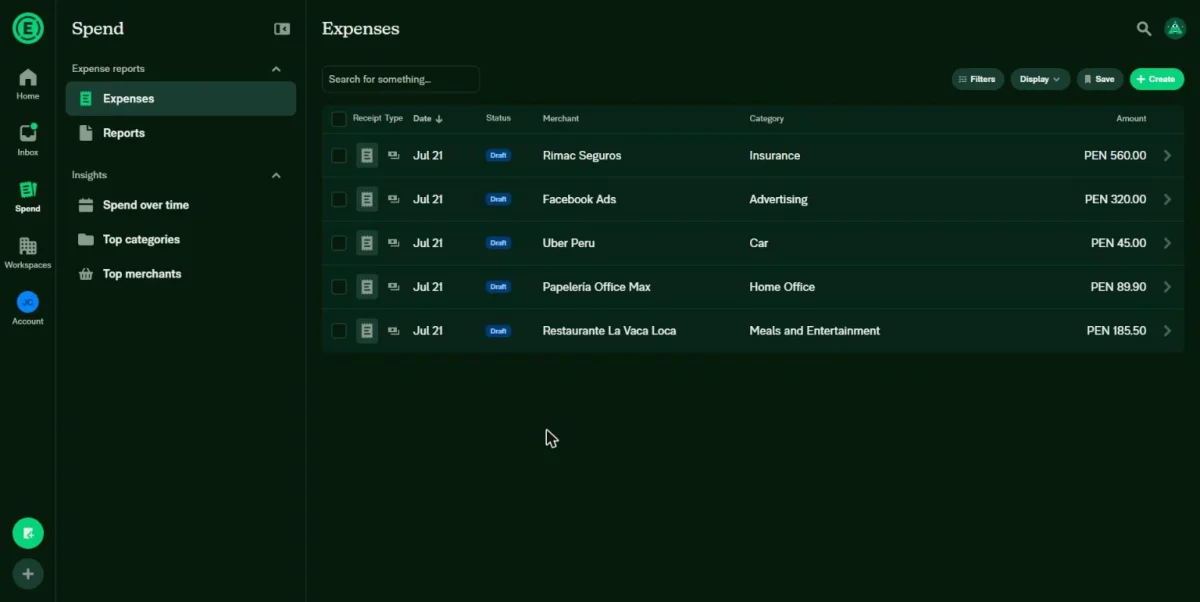
Expensify offers a free plan intended for individual use. Includes receipt scanning with artificial intelligence and person-to-person payments. Of course, the free plan does not include approval flows or accounting integrations. For that, you need the Collect plan, starting at $5 per user per month. Expensify also stands out in the mileage tracking, with automatic GPS and refund calculation. So if your business depends on frequent travel, Expensify covers that case better than most.
Zoho Expense: the option with the best free plan
Zoho Expense allows up to three users for free, with 5GB of receipt storage and 20 automatic scans per month. It also includes multi-currency spending and mileage tracking, free of charge. The cheapest paid plan, Standard, costs $4 per user per month. In addition, Zoho Expense has an interface in Spanish, something that not all of its competitors offer. Therefore, for a small team that is just starting to control expenses, Zoho Expense is usually the most complete option. Of course, check the scan limit before assuming that you have enough for the entire month.
Fyle, now Sage Expense Management: for teams with corporate cards
Fyle changed its name to Sage Expense Management after being acquired by Sage. It does not offer a permanent free plan. The cheapest plan, Growth, costs $11.99 per active user per month, with a minimum of five users. In return, it integrates directly with Visa and Mastercard cards, and allows you to send expenses by text message. Therefore, this option is best suited for teams that already distribute corporate cards among several employees, not for very small businesses.
Apps to control expenses in practice
A freelancer who only needs to organize his own receipts finds everything he needs in Zoho Expense without paying anything. A salesperson who travels often and needs to calculate mileage earns more with Expensify. In addition, a company with several employees who already use a corporate card finds the integrations it needs in Sage Expense Management. None of these apps are superior in the abstract. Therefore, the right decision depends on how many people record expenses in your business.
Comparative table: apps to control expenses
| Tool | Free plan | Plan paid from | Ideal for |
|---|---|---|---|
| Expensify | Individual use, no approvals or integrations | 5 USD/user/month (Collect) | Businesses with frequent travel and mileage |
| Zoho Expense | 3 users, 5GB, 20 automatic scans per month | 4 USD/user/month (Standard) | Small teams that are just controlling expenses |
| Sage Expense Management (formerly Fyle) | No permanent free plan | 11.99 USD/user/month (minimum 5 users) | Teams with corporate cards distributed |
Before deciding, confirm how many users you need to register from the first month. That figure determines whether each app's free plan is really enough for you.
What to look at besides the price
The free plan of these apps to control expenses does not always cover what your business needs in the medium term. Check how many automatic receipt scans each plan includes, because almost all limit that number. It is also worth checking if the app exports reports in a format that your accountant can use directly. On the other hand, think about whether you need to approve expenses before they are paid, or only record them afterward. Of course, all three apps offer some level of trial before paying.
How to choose according to the size of your team
Whether you work alone or with one other person, Zoho Expense's free plan covers almost everything you need. If your team grows to several employees with a corporate card, check out Sage Expense Management or Expensify's Collect plan. Therefore, if you still do not have a billing app defined, check our comparison of free alternatives to QuickBooks for small businesses.
Frequently asked questions about apps to control expenses
Which app to control expenses is totally free? Zoho Expense, up to three users. The other two limit their free version or do not offer it.
Do these apps work without an internet connection? Partially. You can photograph receipts offline, but you need the internet to sync and approve expenses.
Can I use these apps only from my cell phone? Yes, all three have a complete mobile app. They also offer a web version to review reports from your computer.
Do these apps replace my accountant? No. They only organize and digitize the expenses. Your accountant is still the one who interprets that data for your taxes.
Apps to control expenses: in summary
Choosing between these apps to track expenses depends on how many people on your team record expenses each month. Zoho Expense covers the essentials at no cost for small teams. Expensify and Sage Expense Management add more features as your business grows. In the next article we review the electronic invoicing for freelancers in Mexico, with the exact requirements of the SAT.
Frequently asked questions about controlling expenses
To organize the movements after reading the comparison, you can try the cash flow for SMEs and contrast it with your current method.
First record recurring expenses, payments to suppliers and outputs that directly affect the margin of each product or service.
It can be for a small volume, as long as there is a clear structure, backups and a person responsible for updating it.
Consider a specialized tool when you need reconciliation, due date tracking, multiple people working, or periodic reports.